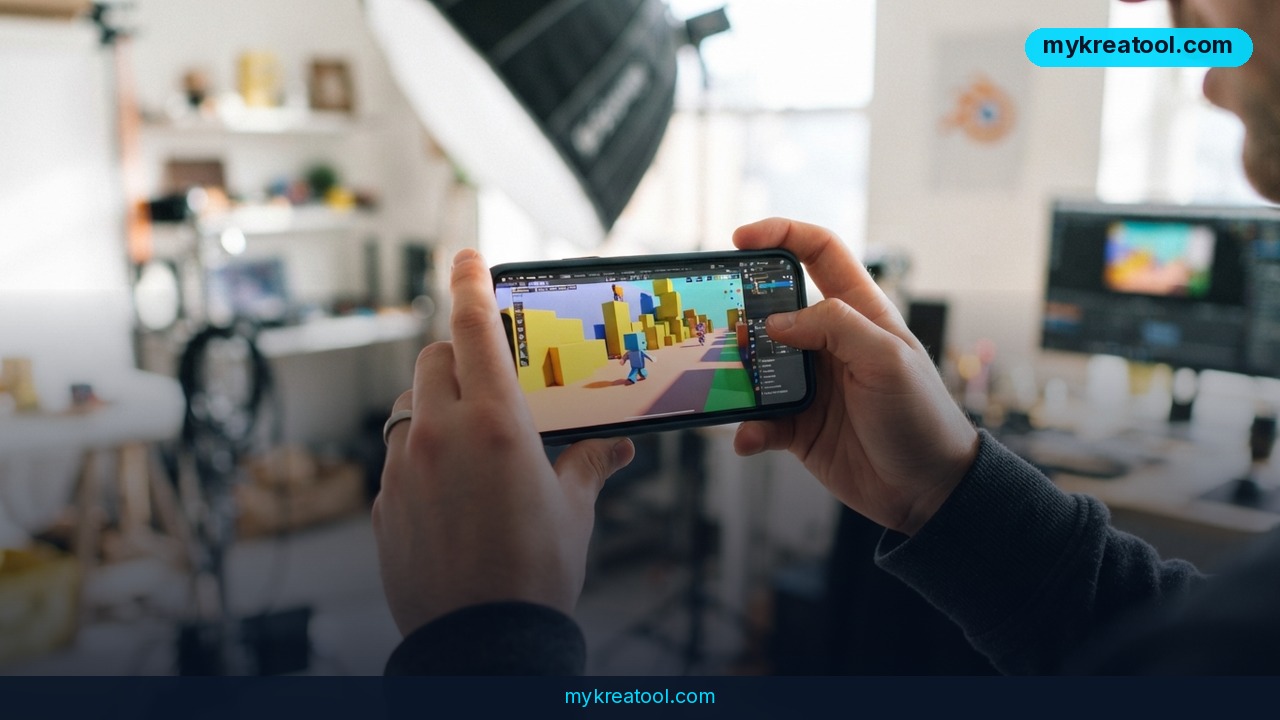
Most AI clips look like they were shot by a camera bolted to the floor. The lighting's gorgeous, the movement is zero — and that's exactly why they feel fake. The fix creators are passing around right now is smartphone camera control: you film a rough 3D scene with your phone, move it around like a real handheld camera, then let an AI video model repaint every frame. Suddenly you've got a cinematic shot without a crew, a drone, or a gimbal.
None of this is brand new — animators have been using phones to drive cameras inside Blender for years. What's new is that the same trick now feeds AI video tools, and the output is genuinely hard to tell apart from live-action footage.
What happened
A post on the Telegram channel @cgevent laid the workflow out in plain steps, and it's been making the rounds: 1,082 views, 54 reposts, 14 reactions. Those aren't viral numbers, but the repost count tells you something — people were saving it to try later.
Here's the gist, in the author's own order:
• Ask an AI agent to connect to Blender and build a simple scene. Nothing fancy. It can even include animated characters.
• Have the same agent hook your phone up to that scene, so you can see it on your screen and feel like you're standing inside it.
• Shoot video however you like — shaky, smooth, running, spinning. Your behaviour *is* the camera move.
• Send that blocky footage to any strong video-to-video model. Done.
Three phrases there need unpacking if you don't live in 3D software. Blender is a free, open-source program for building 3D worlds and animation — it's been the workhorse of indie animation for years. A blocky scene (people also say "blockout") is the grey, untextured version of a set — the cardboard model before anyone paints it. And video-to-video is an AI model that takes a video you already have and repaints each frame while keeping the motion, the rhythm, and the camera path. You bring the movement; the AI brings the visuals.
Quick reality check, because the post makes it sound like one magic agent does everything: it doesn't. Each piece exists on its own today — phone-to-Blender camera tools, video-to-video models that respect camera motion, and inVideo's breakdown of phone capture vs. Blender. The workflow is real; the seamless single-app version is more of a direction than a product.
What it means for you
Around the house
Say you want a tour of your apartment, or a short film set in your kitchen. You don't need rental gear or a crash course in After Effects. Build a rough room, walk your phone through it, and let the AI turn those grey walls into a sunlit loft. Your hands do the cinematography.
At work
Marketing teams spend real money on product b-roll, location shoots, and reshoots when the brief changes. This workflow collapses that. An agent blocks out the scene in minutes, one person walks the phone through it, and the AI produces usable footage the same afternoon. Changing the camera angle costs you another walk across the room.
For business
Anything where a client needs to see a space before it exists works here: interior design previews, event layout walkthroughs, construction concepts. Instead of a static render, you hand them a moving shot that feels like someone filmed it. That's the difference between a pitch that lands and one that gets a polite nod.
While studying
Teachers, students, and anyone explaining a process — history, biology, architecture — can build a crude 3D set, capture a real camera move, and get a polished clip without touching animation software. The phone is the interface. That's the whole point.
For creators and side income
Freelancers are already selling AI clips that sell the feeling of a real camera — parallax, drift, handheld breathing. If you can produce camera motion that looks human, you're charging for something prompt-only creators can't fake. If you want free tools to stack on top of this pipeline, mykreatool.com keeps a solid library of them.
How to try it right now
Five steps, free path first.
1. Install Blender. It's free and open source, with no trial timer. Don't model anything by hand if you don't want to — ask an AI agent (a chat assistant that can run Blender for you) to build a simple room with a couple of objects. A box, a floor, a light.
2. Turn your phone into a virtual camera. Use a Blender add-on that streams camera position and rotation from your phone into Blender in real time. This 80.lv piece shows exactly what that looks like — you hold the phone, watch the scene on its screen, and physically walk your camera through the 3D set.
3. Record the shot like you mean it. Shaky is fine. Actually, shaky is good — that handheld imperfection is why the final AI clip reads as real. Do a slow push in, a pan, a step forward.
4. Send the clip to a video-to-video model. Luma's video-to-video camera-motion workflow is built for exactly this, and there's a walkthrough video covering the Blender side.
5. Compare, then repeat. Run the same camera move twice with different prompts. The motion stays identical; only the look changes. That's a level of consistency prompt-only generation can't give you.
Upsides and what changes
The biggest shift is where the effort goes. In the old pipeline, the expensive part was making the final scene look good — modelling, texturing, lighting, rendering. Now the 3D scene can stay ugly forever. It's scaffolding. The AI handles the final look, and your phone handles the emotion.
That flips a few things:
• Camera work becomes a skill again. Not in a "learn Maya for two years" way. In a "practise a slow dolly in your living room" way.
• Iteration gets cheap. A different angle is a 30-second walk, not a re-render.
• The gear list shrinks. No gimbal, no dolly, no stabiliser, no set.
• You stay in control of motion. Text-to-video gives you whatever the model feels like. This gives you the shot you actually framed.
Limitations
Be honest with yourself before you clear an afternoon. This is a chain of separate tools, not one button — you'll install Blender, add an add-on, keep your phone and computer on the same network, and troubleshoot when the tracking drifts. The grey scene still has to make spatial sense; if the walls are nonsense, the AI will faithfully render nonsense. Tracking jitter and rolling-shutter wobble can leak into the final clip, and video-to-video models will happily melt faces, hands, and small text into mush, especially on long shots. Output length and resolution depend on the model you pick, and the "one agent that does everything" idea is still closer to a recipe than a shipped product. Budget for a few failed takes — the good ones are worth it.
Conclusion and one action for today
The interesting part here isn't the software list. It's that camera movement — the thing that used to require a crew, rails, and a stabiliser — is now something you can produce with the phone in your pocket and a rough blockout in Blender. The AI paints. You direct.
Today's action: open Blender, ask an AI agent for a simple one-room scene, connect your phone as a virtual camera, and record one slow 10-second push forward. That single clip will teach you more than any tutorial.

Comments 0