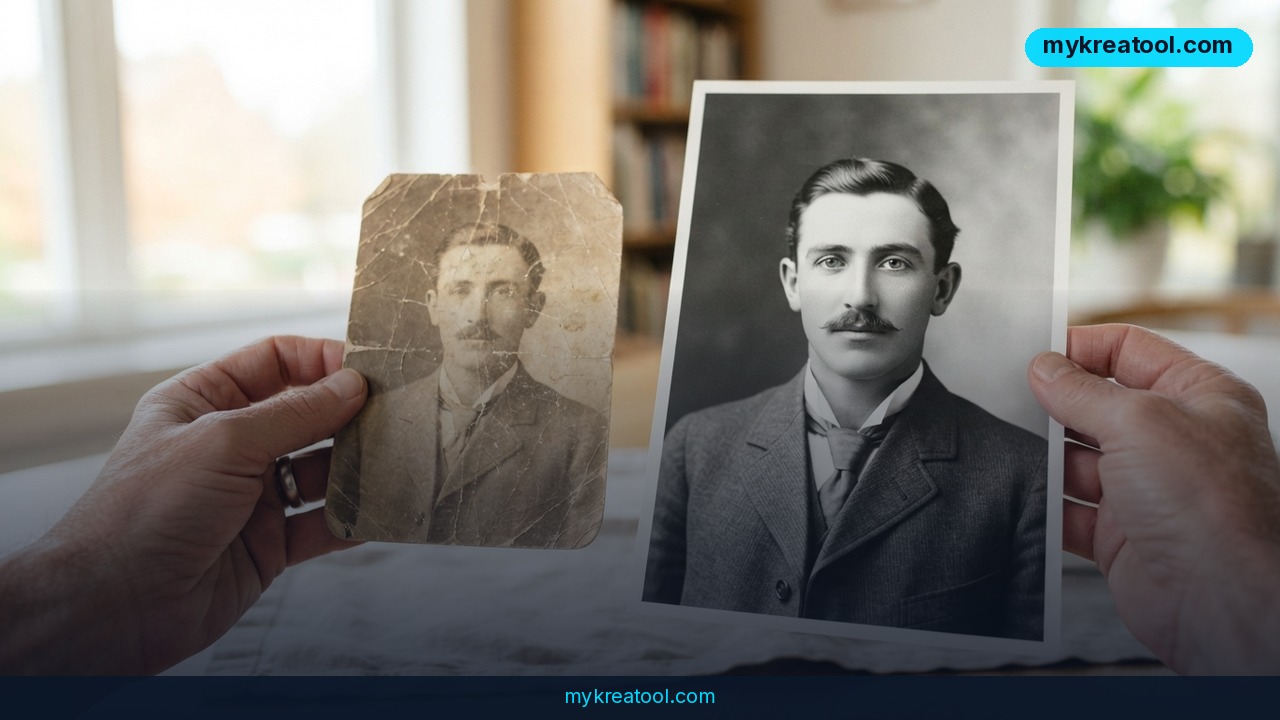
If you've ever tried AI photo restoration on a creased, faded family photo, or pushed it through an AI photo upscaler, and gotten back a complete stranger's face, you know exactly how infuriating that is. The software didn't enlarge your grandfather — it redesigned him. But 2026 has brought a fresh batch of image models, tested on genuinely battered photographs rather than clean studio shots, and the results are a lot less chaotic than they used to be.
What happened
Six current image models went head-to-head on the same thankless job: restoring and enlarging real photographs that had already been through the wars — cracks, scratches, blotchy fading, low resolution. The line-up was GPT Image 2, Nano Banana 2, Grok Imagine Image 2.0, Gen4-Image, FLUX.2-Flex and Qwen-Image-2-Pro. Same pictures, same damage, six very different answers.
One thing worth knowing before you get carried away: this isn't the job any of these models was built for. Most of them exist to generate images from a text prompt, and patching up an old wedding photo is a side quest for them. It also calls for a completely different approach. When you enlarge a photo, you're asking the model to invent pixels the camera never captured. The real question is whether it invents plausible pixels — or somebody else's nose.
And the spread between the six turned out to be wider than anyone expected.
The two ways AI mangles an old photo
There are two classic failure modes, and they're opposites.
The first is hallucination — the AI equivalent of a witness who's far too confident. It doesn't actually know what your grandmother's eyes looked like, so it quietly makes something up. You get a face that's technically sharp and completely wrong.
The second is the reverse: the model plays it safe and enlarges everything faithfully, damage included. Every scratch, every crease, every dust speck gets upscaled right along with the smile. Think of a photocopier that dutifully copies the coffee ring on the page. That isn't restoration — it's just a bigger copy of a broken photo.
Good restoration lives between those two poles. The model has to understand what skin, fabric, hair and handwriting are supposed to look like, and it has to be brave enough to fill in the gaps — without freelancing a whole new face in the process.
Upscaling and restoration aren't the same thing
People mix these up constantly, so here's the plain-English version. Upscaling means making a picture bigger and smoother: more pixels, less blockiness, so it doesn't fall apart on a large screen. Restoration means repairing actual damage — tears, scratches, stains, fading.
They demand different skills. An upscaler that's brilliant on a clean modern phone shot can still turn an old portrait into a waxwork dummy. A restoration tool can fix the cracks beautifully and hand you back something small and soft. That's precisely why the test covered both jobs, and why the results diverged so sharply from one model to the next. Reliability, not raw wow factor, was the thing that separated them.
What it means for you
You don't need to be a photo editor to care about this. Here's where it actually lands in ordinary life.
At home: the shoebox of damaged prints
Everybody has one — the envelope of prints with a torn corner, or a scan of a scan that's already gone soft and grey. This is the exact job these six models are being measured on.
At work: product photos and listings
If your job involves getting images online, old catalogue shots and phone photos of samples can be cleaned up enough to reuse, instead of paying for a reshoot.
For business: client-facing images
Agencies and small studios can repair a client's archive photos without bringing in a specialist or booking studio time.
For studying: archive and document work
Students and researchers working with scanned documents win when a model enlarges text without smearing it into mush.
For creative projects: mood boards and album art
Designers and musicians can dig texture out of old family photos for covers, zines and mood boards.
For income: restoration as a paid service
Photo restoration is something people genuinely pay for — anniversaries, memorials, reunions. A dependable model turns a fiddly freelance job into a fast one.
How to try it right now
You don't need a fancy setup. Work from the highest-resolution scan you can get, or the biggest original file you have — a tiny compressed JPEG gives any model almost nothing to work with.
1. Start free. Open MyKreaTool, which gathers free AI tools in one place, and run your photo through an enhance or upscale option there. No cost, no sign-up drama, and it tells you fast whether the picture is even salvageable.
2. Put your free result up against the paid models. If the damage is heavy, try the same photo in GPT Image 2, Nano Banana 2, Grok Imagine Image 2.0, Gen4-Image, FLUX.2-Flex and Qwen-Image-2-Pro. Use the identical source file for each one so you're comparing fairly.
3. Fix before you enlarge. For really rough scans, restore first and upscale second. Enlarging a scratched photo just gives you a bigger scratched photo.
4. Keep the original untouched. Always work on a copy, and save every attempt under a different file name.
5. Compare side by side, zoomed all the way in. Look at eyes, teeth, hands and any text. That's where hallucination shows up first.
6. Cheat on faces. If a face comes back wrong in every model, crop it out, fix the rest of the photo, then paste the original face back in. A light blur at the edges hides the seam.
7. Read the original test. The full breakdown lives in this Habr write-up: the 2026 photo restoration test.
Upsides and what changes
The genuinely good news is that you no longer need Photoshop skills, a scanner operator or serious editing experience to bring a damaged photo back to life. What used to be a specialist job is now something anyone can do from a browser tab.
The bigger shift is that reliability is becoming the selling point. A model that guesses confidently is worse than useless for restoration — it hands you a beautiful lie. The fact that these tests now focus on how trustworthy each model is, rather than on how impressive the demo looks, tells you where the whole field is heading.
It changes the economics too. Restoration work that used to be quoted by the hour can now be quoted per photo, and small businesses can recycle old image libraries instead of rebuilding them from scratch.
Limitations
Be honest with yourself about what this can and can't do. These models are good, not magic. They can't recover detail that simply isn't in the file — if the original scan lost the information, no amount of clever guessing brings it back, it just invents something that looks right. Heavy damage, blurry faces and low-resolution text are still the hard cases, and results vary so much between models that you'll often need to try two or three before one nails it. Anything with historical or family significance deserves suspicion: a restored face is a plausible guess, not a fact, so keep the original safe and label the restored version as a reconstruction. And as with any upload, think twice before sending irreplaceable private photos to a service you don't trust.
Conclusion
The headline news is simple: in 2026, AI photo restoration is finally good enough to trust with the family archive — provided you pick the right model and keep your expectations honest. Six models were tested on real damage, and the spread between them was bigger than anyone expected, which means your choice of tool matters more than the photo itself.
One action for today: dig out a single damaged photo, scan it at the highest resolution you can manage, and run it through a free AI upscaler. You'll see quickly enough whether it's worth taking further — before you hand it to the heavyweights.
Comments 0